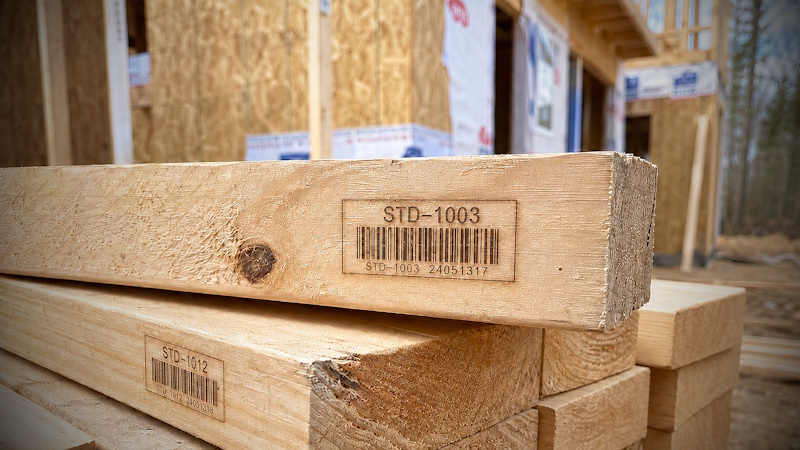
Walk onto any serious construction site and you'll see the same thing: every column, every panel, every beam has a small label on it. STD-0017. PANEL_WALL-0003. A short code that nobody outside the trade thinks twice about, doing a remarkable amount of work behind the scenes.
That code is how the helper knows which stud to grab, how the QA inspector signs off on the right joint, and how — three years later — someone can pull the right document for that exact piece. The convention is familiar from the EPC world (Engineering, Procurement, Construction), but it works just as well in a garage workshop.
What is a tag?
A tag is a short, unique identifier for one specific physical thing in your project. Not a catalogue number (those are shared by everyone who buys a 2×4), but this 2×4. The format is dead simple:
FUNCTION_CODE-SEQUENCE_NUMBER
In a Timbernetic project, you'll see:
- STD-0001 — the first stud
- SLB-0017 — the seventeenth slab
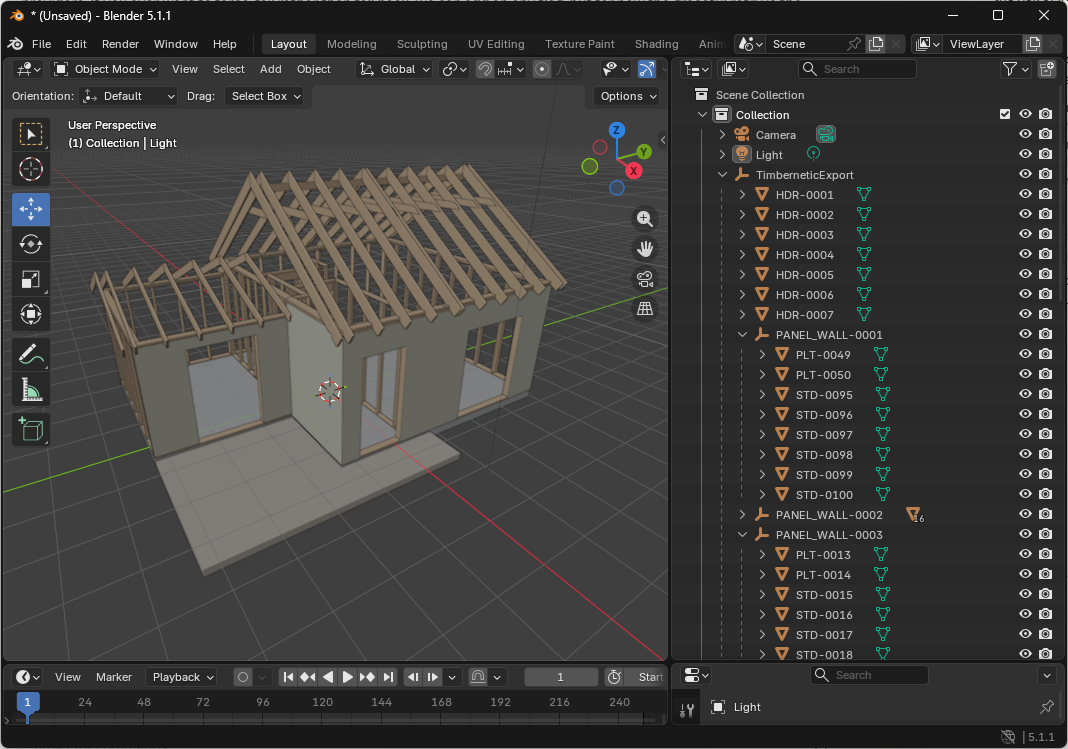
- PANEL_WALL-0003 — the third wall panel assembly
- HDR-0002 — the second header
The function code tells you what kind of thing. The sequence number tells you which one. Zero-pad the sequence (we use four digits) and alphabetical sorting matches numerical order, even with thousands of pieces.
A tag is the bridge between a drawing and a piece of wood.
How Timbernetic implements tags
This is what is currently shipping in the builder.
Automatic tags on element creation
The moment you place an element, the builder assigns it the next available tag for its function code. First stud → STD-0001. Next → STD-0002. Slabs get SLB-XXXX, headers get HDR-XXXX, and wall assemblies get PANEL_WALL-XXXX. Unknown types fall back to their raw name, so nothing breaks when new element kinds are added.
Tags are saved with the project. Close the file, reopen it tomorrow, and STD-0017 is still STD-0017.
The Tag Name column
Tags live in the Elements Hub in a column called Tag Name. It is hidden by default to keep the grid tidy; toggle it on from the column picker when you want to see or work with tags.
The "Rebuild Tag Names" button
Under the Actions accordion sits a Rebuild Tag Names button. It opens a dialog with two options and a live diff preview: "N will change, M unchanged, K newly assigned" for each mode.
- Assign missing only — existing tags are preserved exactly; only blank or malformed ones get filled. Safe when you've already shared drawings.
- Full replace — everything is renumbered from scratch. Useful after a major reorganisation.
Smart numbering order
The rebuild process doesn't number rows in arbitrary order. It groups elements by parent, so all studs inside Wall 1 get consecutive numbers, then Wall 2, and so on. Within each parent, it orders elements spatially — projecting along the dominant axis when elements form a straight run, otherwise falling back to position-based ordering. The resulting sequence tends to match how the pieces are physically arranged.
Uniqueness is guaranteed
There is one monotonic counter per prefix. In Assign missing only mode, Timbernetic pre-seeds the counter from existing tags so new numbers never collide with retained ones. A final consistency check aborts the rebuild rather than ever shipping a duplicate.
Silent fill on load
Opening an older project that predates tagging? The builder quietly fills in missing tags as the project loads, preserving everything that is already there. A console note tells you how many were assigned; save the project to make it permanent.
Why bother tagging at all?
Even before any production-line tooling, having tags on a drawing changes how a project reads.
- The cut list stops lying to you. Instead of "24 studs at 2400 mm" — which papers over the three that need notches, two that are shorter, and one queen post — the list names each piece. The helper grabbing STD-0024 knows it is not just "another stud".
- Specific pieces can be discussed by name. "Bring me the long stud" leaves room for error. "Bring me STD-0014" doesn't.
- Defects, decisions, and changes can be pinned to a specific piece. A note like "STD-0019 has a knot near the notch — use it as a non-load-bearing short stud instead" is impossible without a unique name to attach it to.
- Drawings stay useful longer. A renovation crew in 2050 looking at SLB-0042 on the original plan knows exactly which slab they're cutting into.
What's in it for DIY builders?
For a single bookshelf, you don't need tags. But the moment any of these apply, tagging starts paying for itself:
- You're cutting more pieces than you can carry at once.
- You're working over multiple weekends — and tags remember which board was for which wall when you don't.
- You're working with a helper.
- You're pre-cutting in the workshop and installing somewhere else.
- A piece is custom to a specific spot — it deserves a name.
The workflow doesn't have to be high-tech: write tags on the wood with a carpenter's pencil at the cut station and you're done. A digital plan in Timbernetic just makes generating consistent tags painless.
What's in it for the pros?
If you're already running a shop, you're tagging in some form. The questions worth asking about any tagging system are:
- Is it unique across the whole project, not just within a wall?
- Is it stable over time? Once printed on a label or referenced in a drawing, a tag should not silently change. Timbernetic only renumbers when you explicitly click Rebuild Tag Names.
- Is it sortable? Zero-padding means alphabetical order matches numerical order.
- Is it tied to the physical part, not its position? Move a stud to a different wall, and the tag goes with it.
On the roadmap
A few obvious next steps for the tagging system aren't built yet, and we don't want to oversell. Currently not implemented:
- Barcodes / QR codes on cut stickers. Tags exist in the data; turning them into a PDF sheet ready for a label printer is a future feature.
- Tags in the Bill of Materials. The BOM today summarises by part type. Including per-piece tags is on the list; it's mainly a presentation change.
- Install-order export. Tags themselves don't dictate a build sequence. A future export could lay out "raise STD-0001 to STD-0008, then HDR-0001, then..." but that's not in the tool today.
- Defect tracking / status flags per element. Not yet.
Tagging is the foundation those features will stand on. Get it right first, then build the rest on top.
Getting started
Already using Timbernetic? There's nothing to install. Place an element, toggle the Tag Name column on from the column picker, and you'll see your work is already being tagged. Try the Rebuild Tag Names button on a throwaway project to see how the two modes and diff preview work.
Bottom line
Tagging is the kind of infrastructure you stop noticing because it just works — until the day a question comes up ("which stud was that?") and the answer takes ten seconds instead of two hours. Whether you're a weekend DIYer or running a shop: tag your work. Your future self will thank you.
Comments 0